
← back to all scripts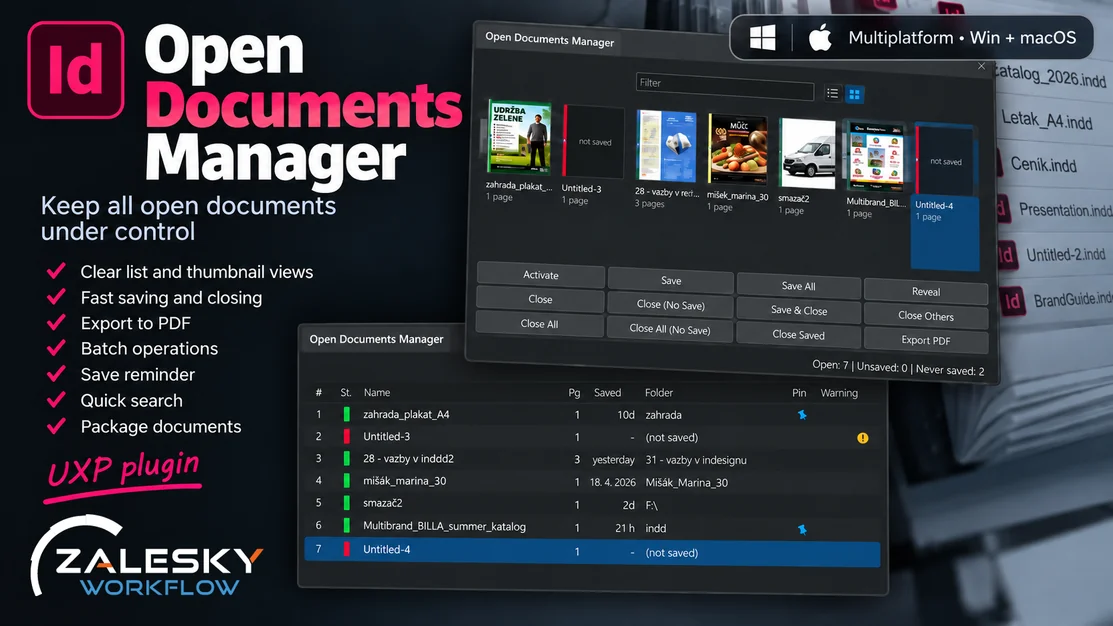
DTP script
Open Documents Manager
New[Windows][Mac][InDesign]
Open Documents Manager gives you a clear overview of every open InDesign document in one place. Quickly switch between files, save or close multiple documents at once, export PDFs, package files, and keep an eye on documents that haven’t been saved for a while. Less clicking. More control. Works with InDesign 18.5 and newer. You will find the full list of features in the manual.
open manual ↗price
19 €
* Prices do not include payment processing fees charged by the Gumroad platform.
Changelogv1.3.3
1.3.32026-09-26
Added
- Export writes JPG, PNG and IDML as well as PDF, and several of them in one run. The formats are tabs in the Export window: tick the ones you want, each with its own folder, its own file name and - for JPG and PNG - its own resolution, quality, colour, anti-aliasing, bleed and spreads.
- File names are yours to shape, per format, and a row of ticks under the box puts the words into the pattern: {name}, {suffix}, {page}, {dimensions} (the page size, 210x297mm), {date}, {time}, {format} and {preset}. Nothing has to be typed or remembered, and a tick shows what is in the pattern whether it was ticked or typed. Images are written one file per page, which is why {page} and {dimensions} exist, and page numbers come out as 01, 02, 03.
- Fill these in for: Web preview (96 ppi, RGB) or Print (300 ppi, with bleed) sets the image boxes in one go. They stay open to be changed.
- Export settings can be saved under a name - Proof, To print - and appear in the panel menu, where they export in one click with no window. Save settings, at the bottom left of the Export window, keeps them without exporting anything; Saved settings at the top fills the window back in from one of them.
- Export again repeats the last export without asking, and says what it was: Alt on the Export button does the same.
Changed
- The Export PDF button, menu item and right-click item are now Export.
- Settings keeps what is true of every export - what to do about a name already in the folder, and whether to open the folder afterwards. Folders, file names and image settings live in the Export window, beside the format they belong to.
- The file names start plain: {name} for PDF and IDML, {name}_{page} for JPG and PNG. Whatever is typed in Name suffix is added after the document's name even when the pattern does not mention {suffix}, so the box works on the plain patterns too; writing {suffix} into a pattern still says where it should go instead.
- A word put into a pattern by its tick brings one underscore with it, and only when there is not one there already: nothing comes out as name__01.
- A page number in a file name is two digits, so ten pages sort as ten pages rather than 1, 10, 2. A page in a section keeps the name the Pages panel gives it, A-3 or iv.
- Every box in a window keeps its width when the cursor lands in it. At a width given as a percentage this host laid a focused field out again and came back with another number, so the boxes jumped as they were clicked into.
- A window fills the window it is in, however it is dragged, instead of leaving a band of nothing under the buttons.
- A dropdown is the width of the boxes around it, open or shut. It used to run the width of the window and shrink the moment it was clicked.
- The tabs in the Export window stand still when a format is ticked: the tick has a place of its own on the tab rather than pushing the name along, and the tab that is open is marked by a line under it instead of a box that changes its size.
- Save settings stands a button's gap from Cancel, the same gap Cancel stands from Export.
Fixed
- An empty Name suffix is empty. It was read as the clash suffix pattern and handed back a lone underscore, so an image came out as leaflet__3 rather than leaflet_3.
- An export whose file name would write every document - or every page - to the same file says so instead of running. A file name left empty puts that format's default back rather than naming everything alike.
1.2.02026-09-25
Added
- Open Set and Save Set show which documents are in the set you pick, so a name a week old no longer has to be remembered.
- Save set is in the right-click menu, not only in the panel menu.
- The Save Set window opens with the cursor in the name box and lists the sets you already have, so one of them can be written over.
- Opening a set asks what to do with the documents already open: save and close them, close them without saving, or leave them alone. It used to be one checkbox that did not say whether closing meant saving.
Changed
- Every window is laid out to one rhythm: checkboxes and radio buttons stand on the same column at the same height, rows are closer together, and settings that belong together - All pages and Range - stand together instead of an inch apart.
- A hint under a checkbox starts under the words it explains rather than under the box.
- Browse stands next to the folder field instead of at the far end of the row.
- Text fields and dropdowns follow the width of the window instead of stopping in the middle of it.
- Settings puts Open folder in the bottom left corner of the window, level with Cancel and Save.
- Radio buttons are InDesign's own: the native control at the size Adobe draws it, filled in the panel's accent colour, with the label centred beside it and the whole row clickable.
- An open dropdown covers the form instead of pushing it down, so the window stays the height it was and the buttons stay where they were, however many presets or sets the list holds.
Fixed
- Minutes between checks cannot be set to a negative number. The spinner refused one; typing one did not.
- Settings opens in front of the panel. It read the data folder from disk before opening, and a window opened after that read rather than straight from the click came up behind the panel.
- A window dragged taller uses the whole of the height. It used to keep the height it opened with and show an empty band under the content — most visible in Settings.
- Every window that asks for something puts the cursor in its first field. It looked for a class no field carries, so no window ever had a cursor waiting.
1.1.02026-09-21
Added
- Export PDF lets you choose All pages or a page range. The range applies to every selected document, and a document that does not have those pages is listed at the end with the reason.
- Export PDF has a Name suffix field: whatever you type is added to the end of every PDF name in that export, for example document_print.pdf. {date} and {time} work there too.
- Export PDF has an Overwrite checkbox, for the times when replacing the PDFs already there is what you want. It starts from the Settings choice and applies to that one export.
Changed
- The list shows the most recently opened document first, the way File > Open Recent reads. The document you just opened goes to the top and becomes number 1; the others keep their places, and switching between documents never reorders the list.
- Pinned documents stay at the top of the list, whatever it is sorted by. A document you open afterwards goes underneath them.
- With several documents selected, Go to Page is left out of the right-click menu. Sync Page is the command for more than one.
- The panel and the manual speak of documents in general rather than leaflets.
Fixed
- Snapshot, Export PDF and Package work in folders whose names contain a space, an accent or a #, on Windows and the Mac. A folder such as "ZAFLO Merge" failed with "Could not find an entry", and a PDF already in such a folder was not noticed, so it could be overwritten instead of getting a suffix.
- The preset list in Export PDF is no longer covered by the page range and name suffix fields below it.
- Sync Page leaves you in the document you started in. It used to leave you in the last document it visited; Reveal for several documents had the same problem.
- Go to Page and Sync Page put the cursor in the page field, so the page can be typed straight away.
- Exporting saved and never-saved documents together no longer sends every PDF to the folder picked for the never-saved ones. The Export PDF dialog says that never-saved documents ask where their PDFs go.
- Dialogs no longer leave an empty band above their buttons. Export PDF fits in its window without scrolling.
- Export PDF exports the pages you chose. It used to take the page range last set in File > Export, so after exporting page 2 of one document by hand, every document exported from the panel came out as page 2 only. Your File > Export setting is left as it was.
- The progress box during an export no longer covers the filter field.
- Documents InDesign keeps open in the background no longer appear in the list. Updating the link to a placed InDesign file used to add that file to the panel as if you had opened it.
- Making page previews no longer changes your own JPEG export settings. The panel used to leave File > Export > JPEG at 72 ppi, low quality and the first page only.
- Page previews and the watchdog's auto-save wait a few seconds after InDesign starts, and never open a dialog while they work in the background.
1.0.02026-09-09
- First release.